Introduction
A three-node Proxmox VE cluster with a single corosync network looks fine on a diagram and fails in exactly the way you'd expect the first time that network hiccups. One dropped switch port, one flaky NIC, or one saturated 1G link shared with backup traffic, and you get a fenced node or a cluster that loses quorum in the middle of a production day. Corosync redundancy exists to prevent that, but most clusters I've walked into have it half-configured: a second link added during setup and then never tuned, with both links treated as equally important when they clearly aren't.
This one covers how corosync's knet layer picks which link carries traffic, how to set link priority so failover actually behaves the way you expect, and how the totem token timeout interacts with all of it. None of this is exotic — it's a few fields in corosync.conf — but getting the defaults wrong is one of the more common reasons clusters flap under load.
Problem Overview
Since Corosync 3, Proxmox VE uses Kronosnet (knet) instead of the older Redundant Ring Protocol for handling multiple links. Kronosnet supports up to 8 links per node and, unlike RRP, it actively decides which link is "best" based on priority and connectivity rather than just striping traffic across all of them. That's a meaningful behavior change if you're coming from an older PVE 5.x or 6.x cluster and assumed both rings were always active.
The problem shows up in two flavors. First, clusters where a second link was added purely as an afterthought — same switch, same VLAN, sometimes even the same physical NIC with a second IP — which gives you the appearance of redundancy with none of the actual fault isolation. Second, clusters where the links are genuinely separate but priority was never set, so knet falls back to numeric ordering (link0 preferred over link1) regardless of which one is actually more reliable or lower latency. On a cluster where link1 is a dedicated 10G ring and link0 is the management network sharing bandwidth with SSH sessions and backup jobs, that default ordering is backwards.
Symptoms
You'll usually see this before you understand it. A node drops out of the GUI's cluster view for a few seconds, comes back, and nobody can explain why. Corosync logs fill up with token retransmit warnings during backup windows. Occasionally a node gets fenced by HA even though it was never really unreachable — just slow to respond on a congested link during the totem token window.
- pvecm status intermittently shows a node missing, then rejoining seconds later.
- HA-managed VMs migrate or restart with no corresponding hardware failure.
journalctl -u corosyncshows repeated[TOTEM] Token has not been receivedmessages clustered around known high-traffic windows (nightly backups, ZFS scrubs, large migrations).corosync-cfgtool -sshows one link flapping between connected and disconnected while the others stay solid.
None of these are dramatic on their own. That's what makes them easy to ignore until the day both links degrade at once and the cluster actually loses quorum.
The HA case deserves its own mention because it's the one that actually costs you something. If a node is running HA-managed guests and it drops out of quorum long enough for the remaining nodes to decide it's gone, they'll fence it and start those guests elsewhere — even though the original node was up the whole time, just slow to answer on a congested corosync link. You end up with a VM running nowhere for a few seconds during the fence, then running twice for a moment during recovery, all triggered by a network blip that had nothing to do with the VM's actual storage or compute.
Root Cause
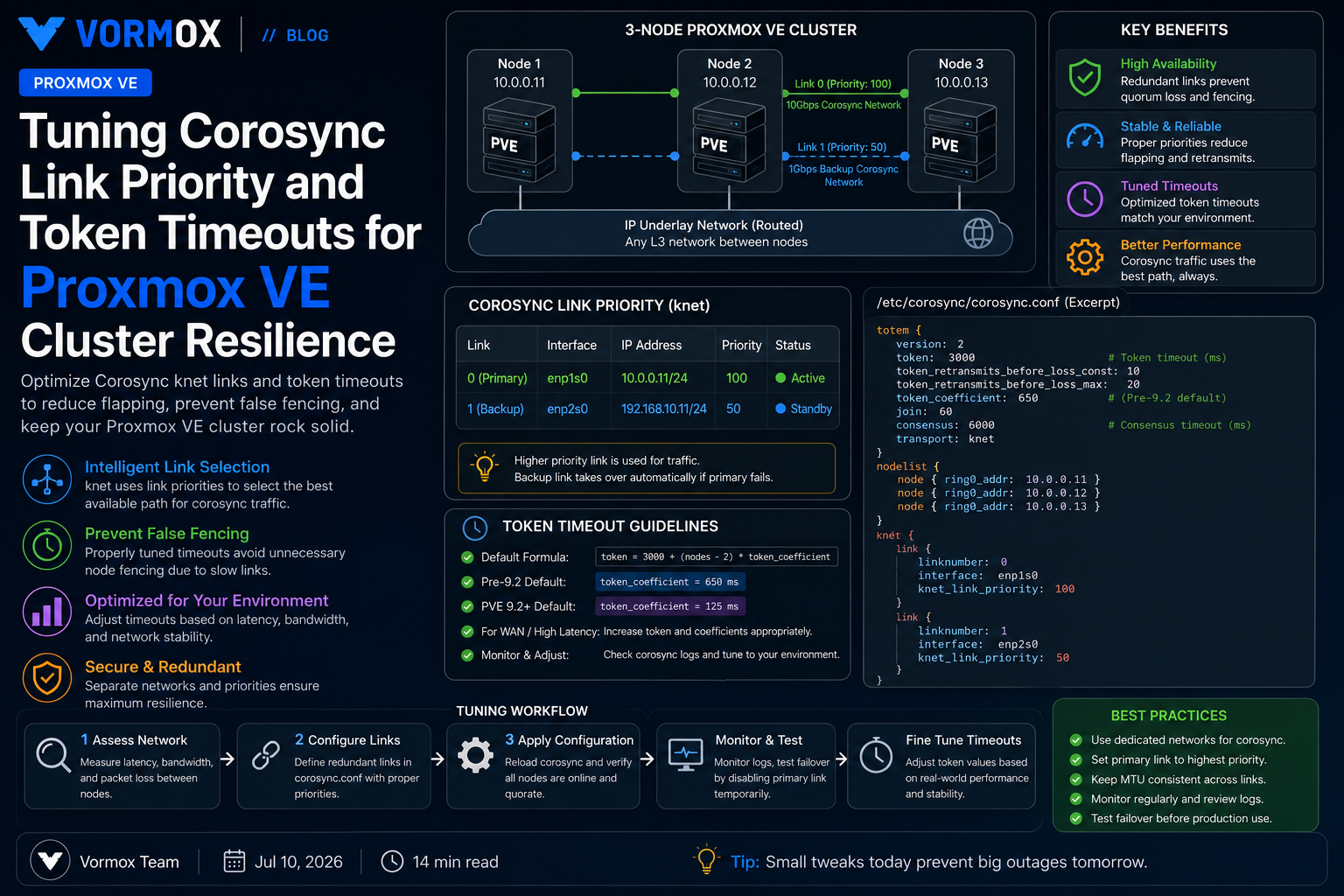
Corosync's totem protocol declares a node unreachable if it doesn't get a token back within the configured timeout. Proxmox VE's default is computed, not fixed: token = 3000 + (nodes - 2) * token_coefficient, with a default coefficient of 650 ms for clusters created before PVE 9.2, and 125 ms for clusters created on 9.2 and later (Proxmox lowered the default to speed up membership changes after a node failure). For a 3-node cluster on the older coefficient, that's a 3650 ms token timeout — long enough that a congested link can cause a retransmit storm without ever fully tripping the timeout, which is exactly the "flapping but never fully down" behavior people report.
The deeper issue is usually link selection, not the timeout value itself. Without explicit priority, knet operates in passive mode using link number as the tiebreaker — link0 is preferred purely because it's numbered first, not because it's better. If link0 happens to be the same 1G management interface used for SSH, the web GUI, and syslog forwarding, and link1 is a dedicated corosync-only 10G network, you've built redundancy on paper while corosync still prefers the busier, less reliable path in practice.
A second, quieter contributor: both links riding through the same physical switch or the same upstream uplink. Redundant links only protect you from failures they're actually isolated from. I've seen "redundant" corosync networks that were two VLANs on the same trunk port — solid until that one port failed, at which point both links died in the same second.
It's also worth understanding knet's active versus passive link mode, because it changes what "priority" actually does. In passive mode — the default, and the one almost every Proxmox VE cluster runs — only the single highest-priority connected link carries traffic at any given moment; the rest sit idle until it fails. In active mode, all links with equal priority carry traffic simultaneously, which trades some bandwidth aggregation for a more complex failure model. Passive mode is the right choice for the vast majority of corosync deployments, since you generally want one clearly preferred path and a clean fallback, not corosync traffic load-balanced across links of different quality.
Diagnosis
Start with link status, not logs. corosync-cfgtool -s tells you which links are configured, which node considers them connected, and — critically — which one knet is actually preferring right now:
Local node ID 1, transport knet
LINK ID 0 udp
	addr	= 10.10.10.1
	status:
		nodeid 1:	link enabled:1 link connected:1
		nodeid 2:	link enabled:1 link connected:1
		nodeid 3:	link enabled:1 link connected:0
LINK ID 1 udp
	addr	= 10.20.20.1
	status:
		nodeid 1:	link enabled:1 link connected:1
		nodeid 2:	link enabled:1 link connected:1
		nodeid 3:	link enabled:1 link connected:1
Here node 3 has lost link 0 entirely. If priority isn't set, that's not necessarily a problem — knet will fail over to link 1 automatically. But if you never verify that failover actually happens, you find out the hard way during an outage.
Next, check what corosync is actually seeing on the wire with journalctl -b -u corosync. The lines that matter look like this:
corosync[1842]:   [KNET  ] link: host: 3 link: 0 is down
corosync[1842]:   [KNET  ] host: host: 3 (passive) best link: 1 (pri: 1)
corosync[1842]:   [TOTEM ] Token has not been received in 1237 ms
That second line is the tell — "best link: 1 (pri: 1)" confirms knet already failed over, and the priority value shown is whatever you've configured (or the default of 0 for both if you haven't). If you see repeated token warnings without a corresponding link-down event, the problem probably isn't the network path itself — it's host-level: CPU steal on an overcommitted node, or corosync competing for CPU time with something else during backup windows. Check that with corosync-cmapctl | grep -Ew 'runtime.config.totem.token|runtime.config.totem.consensus' to confirm your actual configured values, then correlate token warnings against pvesr or backup job schedules before assuming it's purely a network issue.
Finally, confirm actual physical separation. If both corosync links trace back to the same switch, the same uplink, or the same NIC via VLAN sub-interfaces, no amount of priority tuning fixes that — you need a genuinely separate path, even if it's just a second cheap switch dedicated to corosync traffic.
Step-by-Step Solution
The fix has three parts: confirm physical separation, set explicit link priorities so the preferred path is actually the best one, and tune the token timeout only if your hardware and network genuinely warrant it.
- Verify each corosync link terminates on physically distinct infrastructure. If link1 was added as a VLAN on the same NIC as link0, that's not redundancy — move it to a second physical interface first.
- Identify which link should be primary. Usually that's the dedicated, low-latency, unshared network — not necessarily the one numbered link0.
- Set priority explicitly, either at cluster creation or by editing
/etc/pve/corosync.confon an existing cluster. - Bump
config_versionand reload corosync without a full cluster restart. - Confirm the new priority took effect with
corosync-cfgtool -sand a controlled link-down test. - Only after that, evaluate whether the token timeout needs adjusting for your node count and workload.
For a brand-new cluster, set priority at creation time rather than editing the config afterward:
pvecm create prod-cluster \
  --link0 10.20.20.11,priority=20 \
  --link1 10.10.10.11,priority=10
Then join the remaining nodes with matching link order:
pvecm add 10.20.20.11 \
  --link0 10.20.20.12,priority=20 \
  --link1 10.10.10.12,priority=10
For an existing cluster, edit /etc/pve/corosync.conf directly. Because it lives in pmxcfs, the file is already replicated to every node the moment you save it — you're editing one copy, not three.
After editing, increment config_version in the totem block and reload without restarting the service:
corosync-cfgtool -RThat reloads the running config from disk on every node instead of dropping and rejoining the corosync membership, which is what a full systemctl restart corosync would do — avoid the restart on a live cluster if you can help it, since it briefly drops that node out of quorum.
Commands
The commands you'll actually use during this work, roughly in the order you'll reach for them:
| Command | Purpose |
|---|---|
pvecm status | Cluster membership, quorum state, current votes |
corosync-cfgtool -s | Per-link connection status and which link knet currently prefers |
corosync-quorumtool -s | Quorum provider details and ring ID, useful after a config reload |
corosync-cmapctl | grep totem | Dump live totem parameters including computed token/consensus timeouts |
journalctl -b -u corosync | KNET and TOTEM log lines for link flaps and token retransmits |
corosync-cfgtool -R | Reload corosync.conf on all nodes without dropping membership |
pvecm expected N | Manually adjust expected votes during planned maintenance or a degraded cluster |
Run corosync-cfgtool -s right after any config change, on every node, not just the one you edited. It's the fastest way to confirm the reload actually propagated before you move on and assume it worked.
Configuration Examples
A three-node cluster with a dedicated 10G corosync ring as primary and the management network as passive fallback looks like this in /etc/pve/corosync.conf:
totem {
  version: 2
  cluster_name: prod-cluster
  config_version: 9
  transport: knet
  interface {
    linknumber: 0
    knet_link_priority: 20
  }
  interface {
    linknumber: 1
    knet_link_priority: 10
  }
}

nodelist {
  node {
    name: pve1
    nodeid: 1
    quorum_votes: 1
    ring0_addr: 10.20.20.11
    ring1_addr: 10.10.10.11
  }
  node {
    name: pve2
    nodeid: 2
    quorum_votes: 1
    ring0_addr: 10.20.20.12
    ring1_addr: 10.10.10.12
  }
  node {
    name: pve3
    nodeid: 3
    quorum_votes: 1
    ring0_addr: 10.20.20.13
    ring1_addr: 10.10.10.13
  }
}

quorum {
  provider: corosync_votequorum
}
Higher knet_link_priority wins — link0 at priority 20 is preferred over link1 at priority 10, and it only fails over when link0 stops connecting entirely. If both interfaces are left at the default of 0, you're back to numeric ordering, which may or may not match what you actually want.
If you're building a new cluster and want to set the token coefficient explicitly rather than rely on the version-dependent default, add it to the same totem block:
totem {
  version: 2
  cluster_name: prod-cluster
  config_version: 9
  transport: knet
  token_coefficient: 125
  ...
}
Dropping the coefficient from the older 650 ms default down to 125 ms shortens how long a node has to go quiet before it's declared lost — useful on stable, low-latency networks where you want faster HA failover, and risky on anything with occasional latency spikes, because you'll start tripping fencing on transient congestion instead of real failures.
Common Mistakes
The single most common mistake is calling something redundant because it has two IP addresses, without checking whether those two addresses actually traverse independent hardware. A second link on the same switch, same uplink, or same physical NIC doesn't protect you from the failure that matters most — the one that takes out the whole path at once.
Leaving priority unset is the second. It's not wrong, exactly — knet will use numeric order and things generally work — but "generally works" isn't the same as "works the way you assumed it would" when someone eventually asks why the busy management network is carrying corosync traffic instead of the dedicated ring you paid for.
People also tend to lower the token timeout aggressively after reading that lower is "more responsive," without testing it against their actual network conditions first. A token timeout tuned for a clean 10G back-to-back link will cause spurious fencing on a network with even occasional switch-level congestion. Test on one node's worth of failure scenarios before rolling a lower timeout to the whole cluster — and never test it for the first time on a busy production night.
Finally, editing corosync.conf without bumping config_version is a mistake I still see experienced admins make under time pressure. Corosync ignores a file it thinks hasn't changed, and you'll spend twenty minutes confused about why your priority change "isn't taking effect" when it's actually just never being loaded.
Best Practices
Put your dedicated, lowest-latency network as the highest-priority link and treat everything else as fallback — don't just accept link0/link1 in whatever order you happened to add them. Confirm the physical topology of every "redundant" path before trusting it; ask specifically which switch, which uplink, and which power circuit each one depends on.
Leave the token timeout at Proxmox's default unless you have a concrete reason and a tested plan to change it. If you're on a cluster created before 9.2 and want the faster failover the newer default provides, set token_coefficient: 125 explicitly rather than waiting for an upgrade to change it implicitly — but validate it against your actual switch behavior first, not just the spec sheet.
Test failover deliberately instead of waiting for it to happen by accident. Pull a cable, disable a switch port, or use ifdown on the corosync interface temporarily on one node, then confirm with corosync-cfgtool -s that knet actually failed over to the link you expect, and that quorum held. Do this outside business hours on a cluster you already trust, and never on a two-node setup without a QDevice, where losing one link can mean losing quorum outright.
Document the physical path for each corosync link somewhere other than your own memory — which switch, which port, which VLAN. The next person troubleshooting a 2 a.m. quorum loss should not have to reverse-engineer your network from a running config.
If you're running a two-node cluster, none of this link tuning substitutes for a QDevice. Two nodes can never form quorum on their own once one is unreachable — a third vote, even a lightweight external one, is what actually keeps the cluster decisive during a real split. Link priority helps you avoid false failures; a QDevice is what saves you when a failure is real and you still need a majority.
FAQ
Does Proxmox VE still use RRP for corosync redundancy?
No. Since Corosync 3, Proxmox VE uses Kronosnet (knet), which handles link selection and failover differently from the older Redundant Ring Protocol used with Corosync 2.
How many corosync links can a node have?
Up to 8, though most clusters only need two — a dedicated corosync network and a fallback path on a separate physical network.
Do I need to restart corosync after changing link priority?
No. Bump config_version in corosync.conf and run corosync-cfgtool -R to reload without dropping cluster membership.
What happens if two links have the same priority?
knet falls back to numeric link order, with the lower link number preferred — the same behavior you get if priority is left unset entirely.
Is a lower token timeout always better for HA failover?
No. A shorter timeout means faster detection of a genuinely dead node, but also less tolerance for transient network congestion, which can turn a brief slowdown into an unwanted fence event.
Conclusion
Redundant corosync links only do their job when the priority actually reflects which link deserves to be preferred, and when the two paths are separated by more than just a different IP subnet. Set priority explicitly, confirm physical isolation, and leave the token timeout alone unless you've tested the change against your real network — not just read that a lower number sounds better. It's a small piece of configuration for how much it protects: get it right once and this becomes one less thing that pages you at 2 a.m.